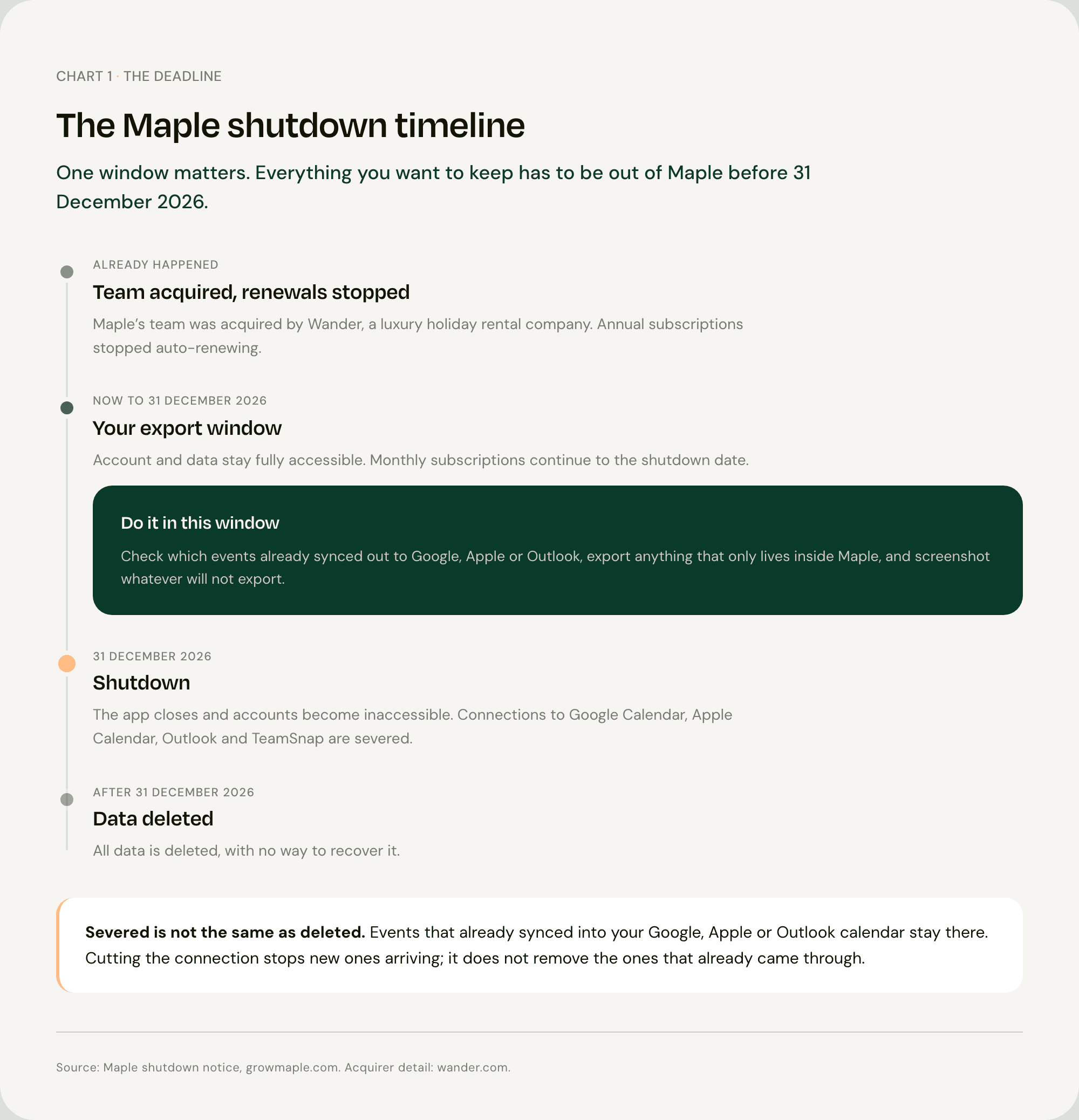
Maple closes on 31 December 2026, and after that the data is deleted for good [1].
Before you do anything else, check one thing: was Maple syncing to your Google, Apple or Outlook calendar? That single fact decides whether this is a ten-minute job or an evening of typing.
Key Takeaway: Maple shuts down on 31 December 2026, after which accounts close and all data is deleted with no way to recover it [1]. Annual subscriptions have already stopped auto-renewing, monthly subscriptions run to the shutdown date, and Maple's connections to Google Calendar, Apple Calendar, Outlook and TeamSnap will be severed at shutdown [1]. Before the deadline, do two things: confirm which of your events were syncing out to a calendar you own, because those survive, and export anything that only ever lived inside Maple, because that does not. Then pick a replacement based on how events get in, not on how the calendar looks.
What Happens on 31 December
Maple's own notice sets out the terms clearly [1].
Your account and data stay fully accessible until 31 December 2026. After that, accounts are closed and inaccessible, and all data is deleted with no way to recover it [1].
Annual subscriptions have already stopped auto-renewing. Monthly subscriptions continue through to the shutdown date. Maple's notice does not mention refunds for unused time, so if you are part-way through an annual plan, ask Maple directly rather than waiting for one to appear [1].
At shutdown, Maple's connections to Google Calendar, Apple Calendar, Outlook and TeamSnap are severed [1].
The reason there is no continuation path is the acquisition. Maple's team was acquired by Wander, a luxury holiday rental company [2].
Which of Your Events Are Already Safe
Start here, because it is the fact that determines how much work you actually have, and no other guide leads with it.
If Maple was syncing to Google Calendar, Apple Calendar or Outlook, those events are already objects inside that calendar. They do not disappear when Maple does.
Read the wording carefully: the connections are severed at shutdown [1]. Severing the connection stops new events flowing across. It does not reach back and delete the ones that already flowed.
Here is the test. Open the calendar app on your phone, find a school event you know came from Maple, and look at it. If it is sitting there in your Google or Apple calendar, it is yours and it stays.
Anything that only ever appeared inside Maple's own screens is the part at risk.
Getting the Rest Out Before the Deadline
Four things, in order, while the account is still live.
Check Maple's settings for an export option and use it now. After 31 December there is no route back [1].
Export from Google Calendar if that is where your events live. Google Calendar has its own export in settings [3], and Google Takeout will produce a full archive [4].
Export from Apple Calendar as an .ics file, which you can do from Calendar on a Mac [5].
Screenshot whatever will not export. Lists and tasks are the likeliest casualties. Maple's notice describes calendar integration and task and list management as core features [1], but every integration it names is a calendar, so anything on the task side may have no export path at all.
Do this in September or October, not the week before Christmas. The deadline falls in the single worst week of the year for family admin.
What Everyone Gets Wrong About Migrating
Maple's team was acquired by Wander, a luxury holiday rental company [2]. That detail matters more than it looks.
When a family app is bought by another family app, the product usually limps on in some form. When the team is bought by a business in an unrelated category, the product is not being continued. It is being switched off. Maple's own notice confirms it: accounts close on 31 December, and all data is deleted [1].
So the advice everyone is giving you, export your data and import it somewhere new, answers the smaller half of the problem.
Here is the larger half. Every guide tells you to move your data. None of them mentions that the data was never the hard part. The hard part is the thing that put the data there in the first place. If you replace Maple with another app you type into by hand, you have signed yourself up to do that job again from scratch, tonight, for every term date in the next school year.
The useful question is not "how do I export my calendar". It is what fills the calendar in once Maple is gone?
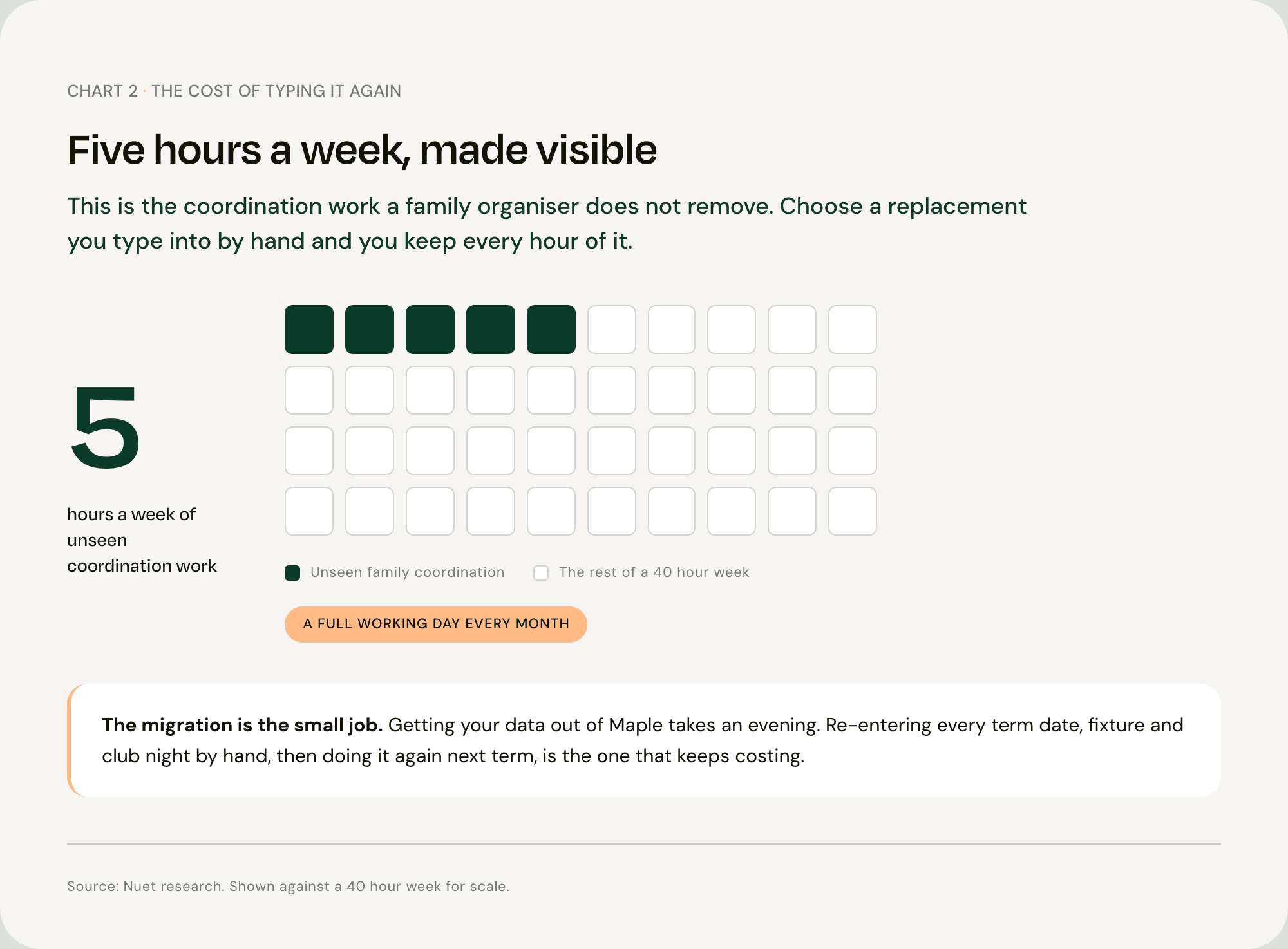
The average parent loses about five hours a week to unseen coordination work. Five hours a week is a full working day every month, and it is the cost of choosing a replacement that only displays events rather than collecting them.
That work is not evenly split either. Women in the UK averaged 3 hours 37 minutes a day on unpaid work, against 2 hours 43 minutes for men [6].
Why the Intake Step Decides Everything
School information does not arrive as a tidy calendar file.
It arrives as an email from the school office. As a PDF newsletter with next term's dates on page three. As a photo of a letter that came home in a bag. As a message in a class group at 9pm.
Every family organiser can display an event. The question is who moves it from the email into the calendar.
With Maple, the answer was you. With Cozi, the answer is you. With Apple Family Sharing, the answer is you. That is not a criticism of any of them, it is just what they are: places to put things, once you have typed them.
The Second Shutdown Problem
Maple is the second family organiser to close inside a year. SuperDuper: Family Assistant shut down on 17 August 2026 after its team went to Life360, and its data was deleted within 30 days [7].
That is not a reason to distrust the category. Two closures in a year is what a young category looks like, and Nuet is a young company in it too.
It is a reason to prefer an app that writes into a calendar you already own. Then the next closure, whoever it happens to, costs you your subscription and not your school year.
Moving to Nuet Instead of Typing It All Again
Nuet connects to your Gmail or Outlook inbox, scans for events, dates, times and attachments, and creates the calendar entries. It reads PDFs and documents, photos of posters and letters, the camera live, voice notes, and messages you forward in from WhatsApp or iMessage.
Those events go into the Google or Outlook calendar already on your phone, not into a Nuet-only calendar. You choose which senders it reads, and no emails are stored on external servers.
What it does not do. Nuet is iOS only. There is no Android app and no web app, so if the other parent is on Android this does not work for your household, and Maple did have an Android app. It reads Gmail and Outlook, not every provider. It does not read WhatsApp groups; you forward messages into it. It does not do shopping lists, meal planning or chores, so if that is what your family used Maple for, Cozi or FamilyWall are the honest recommendations and Nuet is not one of them. It is paid after a seven-day trial.
What You Do Not Have to Re-Enter
This is the payoff, and it is worth being precise about.
You do not re-type next term's dates, because the term-date letter is an email and Nuet reads emails. You do not transcribe the swimming timetable if it arrived as a PDF. Anything already sitting in your Google or Outlook calendar is already there, so there is nothing to import at all.
What you do still enter by hand: anything that never arrived digitally, and the one-off things you simply know about. That is what manual entry is for, and every calendar needs it.
Doing It Before January
Install Nuet on your iPhone or iPad, connect your inbox, and pick the senders it should read.
Do it while your Maple account is still live. Run both for a fortnight and check that nothing is falling through the gap. That is standard advice for any migration, and it is the reason not to leave this to 30 December. There is a seven-day free trial.
If Nuet Is Not the Right Move
You are about to be let down by one app, so here is where Nuet is the wrong answer.
Android in the household, or a zero budget. Cozi is free and runs on iOS, Android and the web.
Lists, meals and chores as the main job. Cozi and FamilyWall both cover far more of that than Nuet, which covers none of it.
A shared calendar across two households. TimeTree handles that pattern well.
Documented co-parenting communication. OurFamilyWizard and TalkingParents are built for it. Nuet is not a legal record.
FAQ
Q: When exactly does Maple shut down?
Maple shuts down on 31 December 2026. Data stays fully accessible until that date, after which accounts are closed and inaccessible, and all data is deleted with no way to recover it [1].
Q: Will I get a refund for my Maple subscription?
Annual subscriptions have already stopped auto-renewing, and monthly subscriptions continue through to the shutdown date [1]. Maple's notice does not mention refunds for unused time, so contact Maple directly if you are mid-term on an annual plan rather than assuming one is coming.
Q: What happens to the Maple events already in my Google or Apple calendar?
They stay. Maple's connections to Google Calendar, Apple Calendar, Outlook and TeamSnap are severed at shutdown [1], which stops new events flowing but does not remove events that have already synced. Those entries belong to your calendar, not to Maple. Anything that only ever existed inside the Maple app is the part you need to export.
Q: Is the Maple family app the same as the other Maple apps?
No, and it is worth knowing if you are searching. Maple Family Organizer is at growmaple.com. There is also a Maple HR platform, a Maple telehealth service in Canada, and Maple Calculator from Maplesoft, none of which are connected to the family app or affected by its closure.
Q: What is the closest replacement for Maple?
It depends what you used it for. If the job was a shared calendar and lists on any device for free, Cozi is the straightforward answer. If the job was keeping up with school emails and the dates buried in PDF newsletters, Nuet connects to Gmail or Outlook and creates those events for you, though it is iOS only and paid after a seven-day trial.
Sources
[1] Maple — Maple, Family Planner and Organizer, shutdown notice [2] Wander — Wander, luxury vacation rentals [3] Google — Export events from Google Calendar [4] Google — Google Takeout, download your data [5] Apple — Export calendars in Calendar on Mac [6] Office for National Statistics — Time use in the UK, 23 September to 1 October 2023 [7] SuperDuper Labs — SuperDuper is shutting down, FAQ