The school sports day is still in your Google Calendar. The thing that put it there is not.
That is the odd part about losing SuperDuper. Some of your family's schedule survived and some of it did not, and there is no obvious way to tell which is which without going and looking.
Here is what happened, what you still have, and what to do about the job SuperDuper was quietly doing for you.
Key Takeaway: SuperDuper: Family Assistant shut down on 17 August 2026 after its team was acquired by Life360, and all customer data (accounts, family profiles, calendar and email derived content, and chat history) was deleted within 30 days [1]. No data moved to Life360, and there is no SuperDuper 2.0 [1]. Any event SuperDuper had already written into your Google Calendar is still there. Anything that only ever existed inside SuperDuper's own dashboards is gone. To replace what it actually did, the reading of your inbox for school dates and dates buried in PDF attachments, you need an app that connects to your email rather than one that gives you another calendar to fill in by hand.
What Actually Happened to SuperDuper
SuperDuper's team was acquired by Life360, and the app stopped working at the end of the day, Pacific time, on 17 August 2026 [1]. Its access to your Gmail and Google Calendar was disconnected at the same moment [1]. The support address stayed open for a further month, until 17 September 2026 [1].
SuperDuper was free, so there is nothing to cancel and no refund to chase [1].
The question most parents actually had was about the email content, and the answer is on the record. SuperDuper's own FAQ states that customer data was not sold and was not transferred to another company, and that Life360 did not receive SuperDuper accounts or data [1]. If you want to use Life360, you set it up from scratch as a new account [1].
There is no successor. The FAQ is explicit that the product is retired [1].
What Survived and What Was Deleted
This is the part worth getting straight, because it decides how much work you have ahead of you.
Deleted within 30 days of shutdown: your account, your family profiles, all calendar and email derived content, and your chat history [1]. That includes the dashboards, which were the thing that made SuperDuper feel useful.
Still yours: every event SuperDuper had already written into your connected Google Calendar. Those entries became Google Calendar events the moment they were created. They do not belong to SuperDuper, so they did not leave with it.
So the swimming gala it added in June is still on your phone. The view that showed you the week ahead is not.
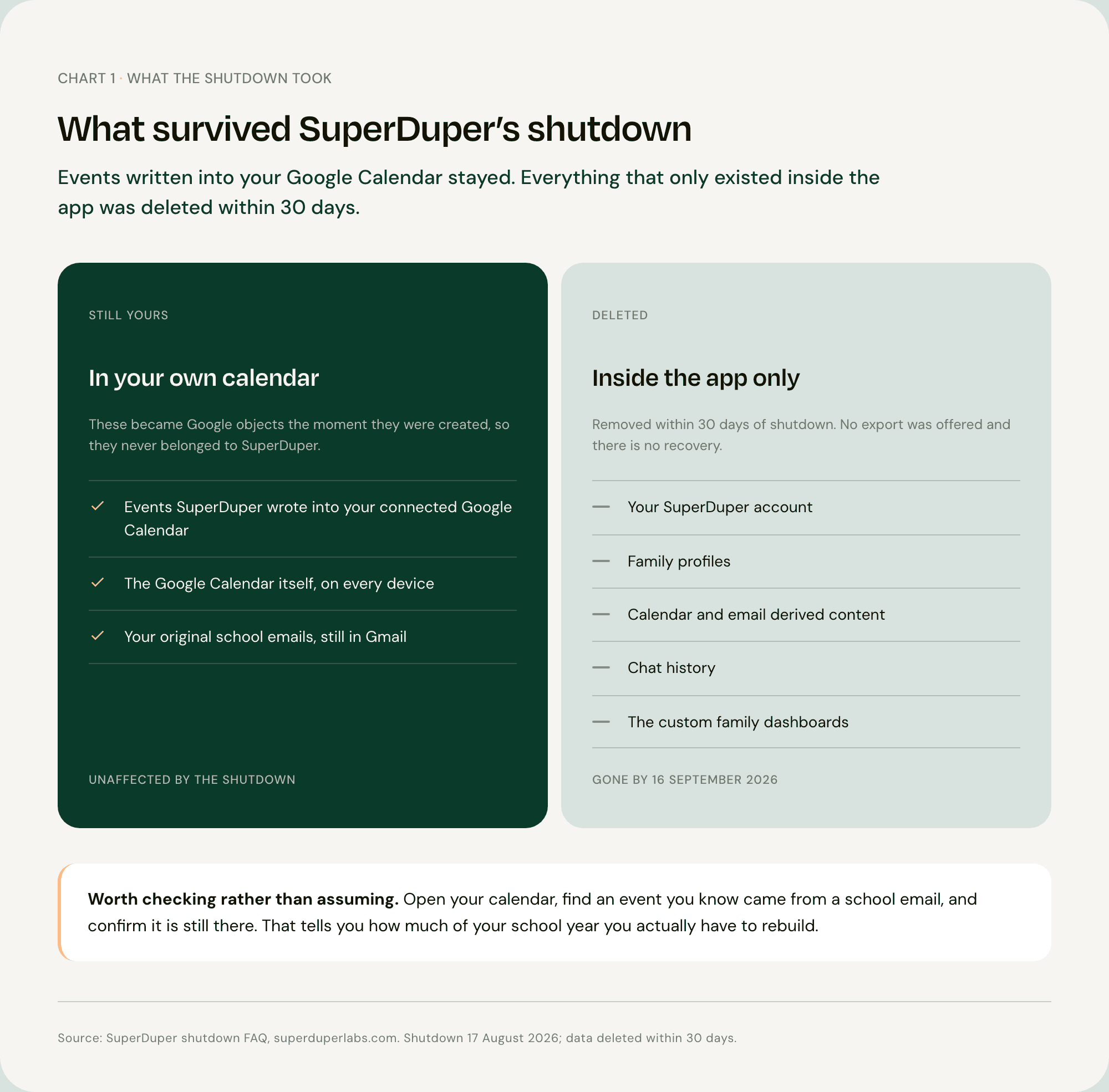
Go and check rather than assume. Open your calendar, find an event you know came from a school email, and confirm it is still there.
While you are at it, it is worth reviewing which apps still have access to your inbox. You can see and remove third-party app permissions in your Google Account settings [2]. SuperDuper's own access was revoked automatically at shutdown [1], but it is a good habit whenever an app you connected to your email closes down.
The Question to Ask Any Replacement
Every migration guide answers the wrong question. They all ask which app has the best shared calendar. The lesson of SuperDuper's closure is that the shared calendar was never the hard part, and it was never the part at risk.
SuperDuper did the hard part well. It read your inbox, it found the dates inside PDF attachments, and it built dashboards on top of them. Then the team was acquired and all of it switched off on one day in August.
So the question worth asking a replacement is not "does it have a family calendar". It is when this one closes, what do I keep?
There are two answers, and only two. An app that keeps your events inside its own walled garden takes them with it when it goes. An app that writes into the Google or Outlook calendar you already own leaves the events behind, because they were never really in the app to begin with.
Nuet is the second kind. That is less a feature than an insurance policy, and SuperDuper's shutdown is the reason to care about it.
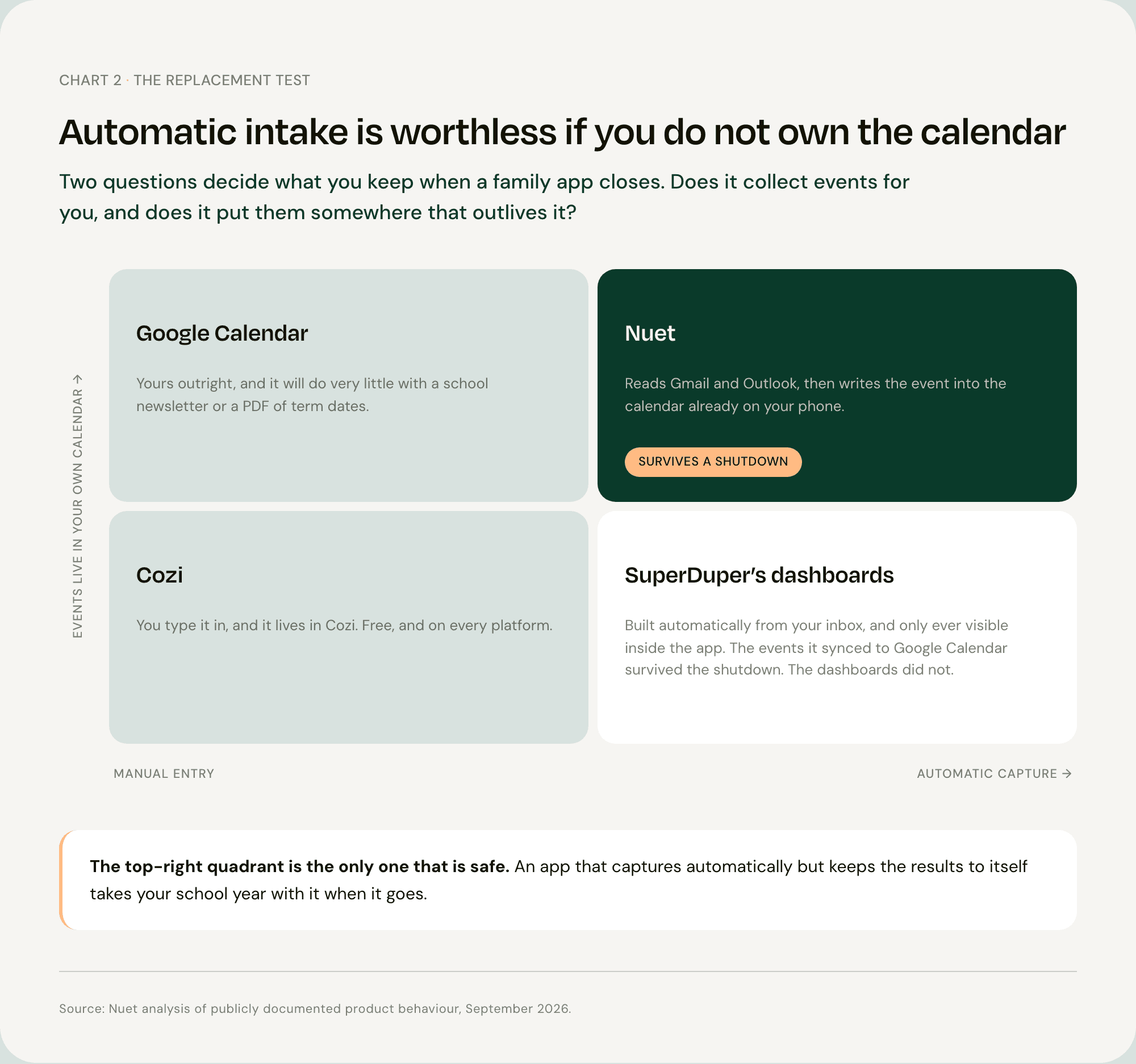
Apply the test to the apps you are probably weighing up. Cozi is manual entry into Cozi's own calendar. Google Calendar is a calendar you own outright, and it will do very little with a school newsletter. Nuet reads the email and writes the result into the calendar you already have.
Where the Events Live
Most parents have never had a reason to think about this, and it is simpler than it sounds.
When an app writes an event into your Google or Outlook calendar, that event becomes a Google or Outlook object. Deleting the app does not delete it. It shows up on your phone, your partner's phone and your laptop, because it is in the calendar rather than in the app.
When an app keeps events in its own database and only shows them to you inside its own screens, the events end when the app does.
You can see the same distinction in Maple's shutdown notice, which warns that its connections to Google Calendar, Apple Calendar and Outlook will be severed at shutdown [3]. Severing a connection stops new events arriving. It does not remove the ones that already came through.
Why Automatic Intake Is the Part Worth Paying For
You did not install SuperDuper because you were short of a calendar. You had several.
You installed it because school information does not arrive as a calendar. It arrives as an email from the office, as a PDF newsletter with next term's dates on page three, as a photo of a letter that came home in a bag. Somebody has to move it across. That somebody is now you again.
The average parent loses about five hours a week to unseen coordination work. Five hours a week is a full working day every month.
That work is also not evenly split. Women in the UK averaged 3 hours 37 minutes a day on unpaid work, against 2 hours 43 minutes for men, a gap of 54 minutes a day [4].
How Nuet Replaces What SuperDuper Did
Nuet connects to your Gmail or Outlook inbox, scans for events, dates, times and attachments, and creates the calendar entries. It runs in the background, and you choose which senders it reads. No emails are stored on external servers.
The events go into the Google or Outlook calendar already on your phone, which is the property the section above spent several hundred words arguing for.
What it does not do, plainly. Nuet is iOS only. There is no Android app, no web app and no desktop version, so if the other parent is on Android this is not a like-for-like swap, because SuperDuper had an Android app and Nuet does not. It reads Gmail and Outlook, not every mail provider. It does not read your WhatsApp groups; you forward messages into it. And it is paid after a seven-day trial, where SuperDuper was free [1].
The Six Places Nuet Picks Up an Event
The list is more interesting as an answer to a different question: where does family information actually arrive?
Your inbox. Gmail and Outlook, including multiple accounts at once.
PDFs and documents. The term-date letter, the fixtures list, the newsletter.
Photos. A poster, a flyer, or a letter that came home in a bag.
The camera, live. Point it at something with a date on it.
Voice notes. Record or upload one and it pulls the details out.
Forwarded messages. Send a WhatsApp or iMessage into Nuet and it reads it.
Manual entry is there too, for the things that never arrived digitally.
Setting It Up Before the Next Term Letter
Install Nuet on your iPhone or iPad, connect your inbox, and choose which senders it should read. Events land in the calendar you already use.
September is the right week to do it. School communication is at its annual peak, and the term-date letter you have not opened yet is exactly the kind of email this is for. There is a seven-day free trial.
If Nuet Is Not Right for You
You have just been let down by one app, so here is where Nuet is the wrong answer.
If anyone in the household is on Android, or the budget is zero. Cozi is free and runs on iOS, Android and the web. Nothing above changes that.
If the job was lists and meals rather than dates. Cozi covers shopping lists, to-do lists and meal planning. Nuet does none of those.
If you want location alongside logistics. SuperDuper's own FAQ pointed users towards Life360 [1]. Worth knowing that setting it up is entirely separate and none of your data carried over [1].
If you need documented co-parenting communication. OurFamilyWizard and TalkingParents are built for that. Nuet is not a legal record and does not try to be.
FAQ
Q: When did SuperDuper shut down?
SuperDuper: Family Assistant stopped working at the end of the day, Pacific time, on 17 August 2026 [1]. Its access to Gmail and Google Calendar was disconnected at the same time, and the support address stayed open until 17 September 2026 [1].
Q: Can I get my SuperDuper data back?
No. SuperDuper deleted all customer data, including accounts, family profiles, calendar and email derived content, and chat history, within 30 days of shutdown [1]. There is no export and no recovery. Any event SuperDuper had already added to your connected Google Calendar is still in Google Calendar, because that entry belongs to your calendar rather than to the app.
Q: Did my SuperDuper data go to Life360?
No. SuperDuper's FAQ states that data was not sold and was not transferred to another company, and that Life360 did not receive SuperDuper accounts or data [1]. If you want to use Life360, you set it up as a new account from scratch.
Q: Is there a SuperDuper alternative that also reads school emails?
Nuet connects to Gmail and Outlook and creates calendar events from what arrives there, including PDF attachments, photos of letters and voice notes. It writes those events into the Google or Outlook calendar you already use rather than keeping them in its own app. It is iOS only and paid after a seven-day trial, neither of which was true of SuperDuper.
Q: Do I need to remove SuperDuper's access to my Google account?
Its permissions were revoked automatically at shutdown [1]. If you want to confirm nothing is left behind, you can review and remove third-party app access in your Google Account settings [2]. It is worth doing whenever an app you connected to your inbox closes.
Sources
[1] SuperDuper Labs — SuperDuper is shutting down, FAQ [2] Google — Manage third-party apps and services with access to your account [3] Maple — Maple, Family Planner and Organizer, shutdown notice [4] Office for National Statistics — Time use in the UK, 23 September to 1 October 2023