Search "home management app" and you get a list containing an app for logging your boiler's service history, an app for splitting the electricity bill with your housemate, and a shared family calendar.
Those are not competitors. They are three different products that happen to share a phrase.
Which is why so many of these downloads get abandoned in a week. The app worked fine. It just was not solving the problem you had.
Key Takeaway: "Home management app" covers three different jobs, and the right pick depends entirely on which one you have. For the house itself, meaning maintenance schedules, appliance warranties and home inventory, HomeZada is the established option [1]. For dividing chores and shared bills between the people living there, Flatastic is built for exactly that [2]. For household admin, the renewals and deadlines and appointments that arrive by email with a date attached, the job is capture rather than tracking, and Nuet reads a Gmail or Outlook inbox and creates the entries itself, though it is iOS only and paid after a seven day trial.
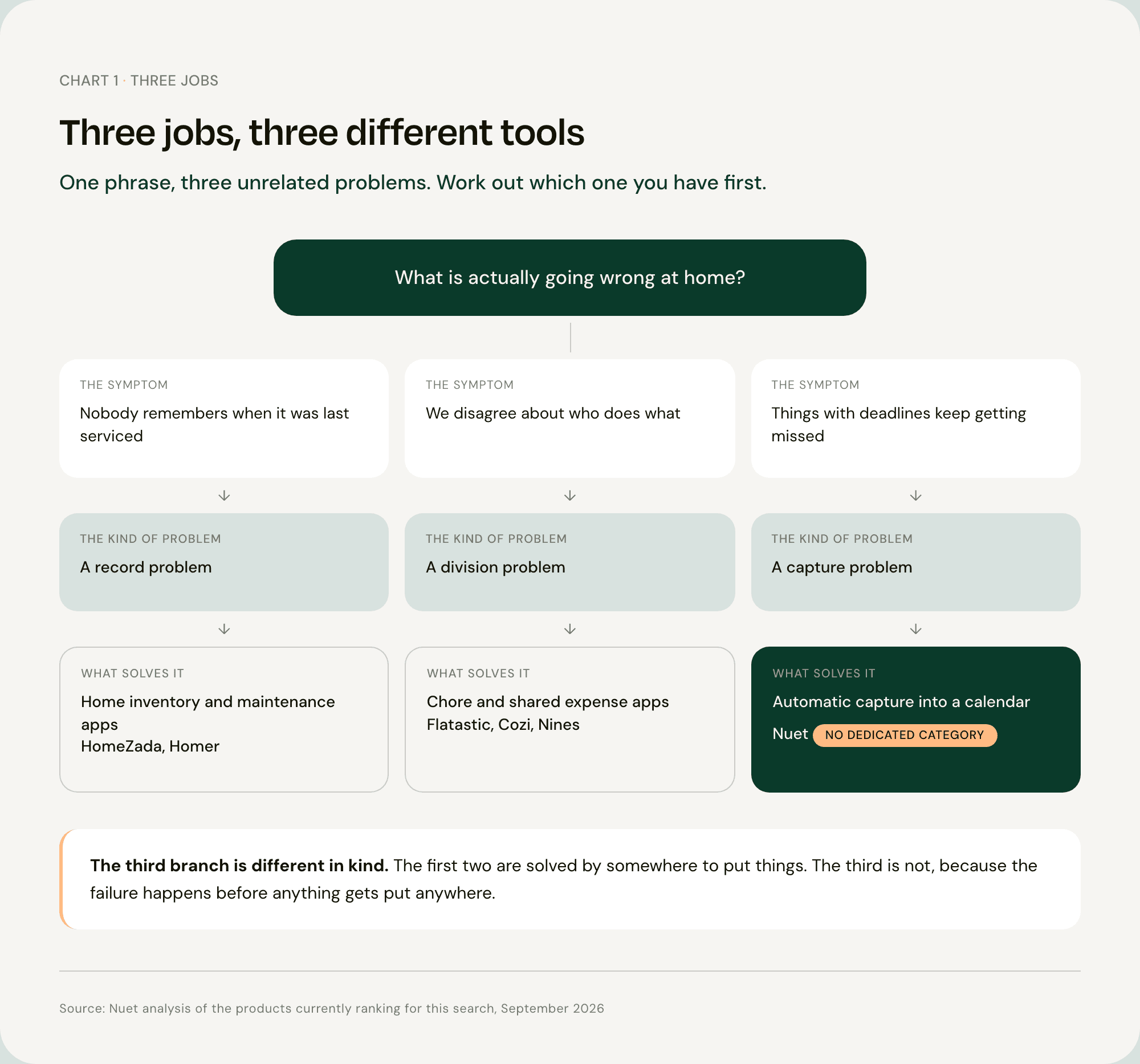
The Three Jobs People Mean by Home Management
Tracking the House
Maintenance intervals. Appliance warranties. Which paint went on the hallway. What the plumber did in March. A photo inventory in case you ever have to make an insurance claim.
This is a record-keeping job, and it rewards a dedicated tool. HomeZada is built for it [1], and Homer is the lighter version [4].
A calendar is a bad place to keep a serial number.
Dividing the Work Between People
Who takes the trash out, who paid for what, and how it gets divided.
Flatastic is purpose-built for this and came out of the shared-apartment world [2]. Nines works the same territory at the top end, for households running staff and more than one property [3].
Worth saying plainly: this job is mostly a negotiation wearing a software costume. The app matters much less than whether both people agreed to use it.
Catching What Has a Deadline
The insurance renewal. The passport that expires in March. The dentist appointment. The form due Friday. The car service.
This is the biggest of the three by volume and it has almost no dedicated tooling, which is strange until you look at why.
A home maintenance app will happily remind you to service the boiler every year, because you told it to. Nothing tells you the insurance renewal quote arrived on Tuesday, because you did not know it was coming.
That asymmetry is the whole point. Jobs one and two are tracking problems, and tracking problems are solved by giving things somewhere to live. Job three is a capture problem, and somewhere to live does not help, because the failure happens before anything gets put anywhere.
So work out which job you have before you download anything. An app that solves job one will not touch job three, and the reverse is just as true.
The Nine Best Home Management Apps
1. Nuet, Best for the Admin That Arrives by Email
Job three. Nuet connects to Gmail and Outlook, several accounts at once, scans for events, dates, times and attachments, and creates the calendar entries. It reads photos of letters, PDFs and documents, the camera pointed at a notice, voice notes, and messages forwarded in from WhatsApp or iMessage. It keeps track of home, car and paperwork admin, meaning renewals, documents and deadlines.
Entries land in the Google or Outlook calendar already on your phone. You choose which senders it reads, and no emails are stored on external servers.
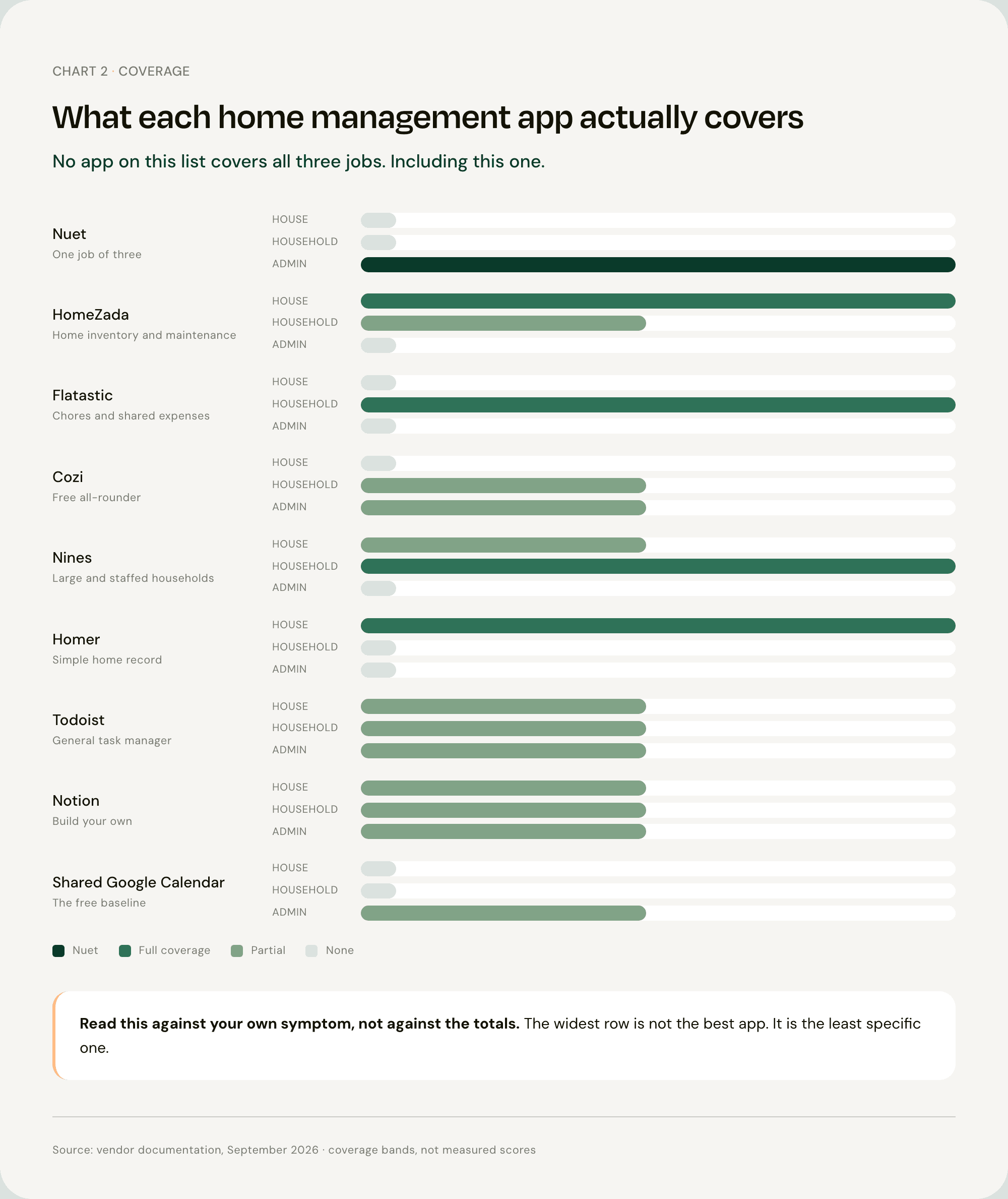
What it does not do, and this matters more than usual here. Nuet does job three only. There is no home inventory, no maintenance schedule, no warranty tracking, no chore assignment and no bill splitting. If any of those is the reason you started searching, one of the apps below is your answer and this one is not.
It is also iOS only, reads Gmail and Outlook rather than every provider, does not read WhatsApp groups (you forward messages in), and is paid after a seven day trial.
2. HomeZada, Best for the House Itself
Job one, and the most established name in this category. Home inventory, maintenance schedules, documents, projects and home finances in one place [1].
The use case nothing else here covers is insurance documentation: a photographed, itemized record of what you own, kept somewhere that is not the house that might burn down.
If your recurring problem is that nobody can remember when the furnace was last serviced or where the warranty went, this is the download.
3. Flatastic, Best for Splitting Chores and Bills
Job two. Built for shared households, covering chores, shopping lists and shared expenses [2].
It came out of the flatshare world, and the framing still shows. For some households that is refreshingly neutral, and for others "roommate" language sits oddly on a family.
If the recurring argument in your house is about who does what and who paid for what, this is built for that argument specifically.
4. Cozi, Best Free All-Rounder
Cozi spans jobs two and three, at a shallow depth on both. A color-coded shared calendar with shopping lists, to-do lists, chore tracking and recipes, free on every platform, with Cozi Gold removing the ads [5].
This is the one to try first if you are genuinely not sure which job you have, because trying it costs nothing and a week with it usually tells you.
5. Nines, Best for Complex Households
Job two at the high end. Household management built for larger homes, including staff, vendors and multiple properties [3].
It ranks for this search, and for a narrow group it is genuinely the right answer.
For most families it is considerably more machinery than the problem requires, and that is worth saying rather than leaving you to discover it.
6. Homer, Best Simple Home Record
Job one, lighter than HomeZada. A straightforward app for keeping a home's records in one place [4].
The shorter entry is deliberate. If HomeZada feels like more product than you want, this is the smaller version of the same idea.
7. Todoist, Best if You Want One List for Everything
Cross-job. A general task manager rather than a home app, and it earns its place because plenty of households genuinely run on one [6].
The honest limitation is the same as its strength. It will hold anything, which means it holds nothing in particular, and a generic task manager asks more discipline of you than a purpose-built app does.
8. Notion, Best for Building Your Own System
Cross-job, and fully customizable [7].
The warning that belongs with it: a Notion home system is a project, not a download. The households that succeed with one are largely the households that would have succeeded with a spreadsheet.
If building the system is something you will enjoy, this is the most flexible option here. If it is something you will start on a Sunday and abandon by Thursday, pick something narrower.
9. A Shared Google Calendar Plus a Reminders List, Best Free Setup
Not an app, and last on purpose.
It is free, cross-platform, and already on every phone in the house. It covers job three badly and jobs one and two not at all.
That is exactly why it belongs here. Run it for a month as the control experiment. Whatever still gets missed is your real problem, and now you know which of the eight above to download.
Which Home Management App to Actually Download
If Things Break and Nobody Remembers When They Were Last Serviced
HomeZada, or Homer if you want something lighter [1][4].
A calendar will not help here, because the problem is a missing record rather than a missing reminder. You do not need to be told sooner. You need somewhere the information lives.
If the Argument Is About Who Does What
Flatastic, or Cozi if you want a calendar attached [2][5].
And the honest part: the app is the easy bit. Both people have to agree to open it, and no software has yet solved that one.
If Things With Deadlines Keep Getting Missed
Renewals, appointments, forms, expiries. If this is the pattern, the failure is happening at capture, before anything ever reaches a list, which is why adding another list has not worked.
That is the job Nuet does. Seven days free, and pricing is here.
FAQ
Q: Is there a free app to organize your house? Yes, several. Cozi is free on every platform and covers a shared calendar, shopping lists, to-do lists and chore tracking, which makes it the broadest free option here [5]. For the house itself rather than the household, HomeZada has a free tier for inventory and maintenance [1]. And a shared Google Calendar with a shared reminders list costs nothing and is already on your phone, which makes it worth a month's trial before you install anything else.
Q: What are the best home maintenance apps? HomeZada is the established pick, covering maintenance schedules, appliance records, warranties and home inventory in one place [1]. Homer is the lighter alternative if a full property record is more than you need [4]. Both are genuinely different products from a family organizer, and this is the distinction most lists blur: a maintenance app remembers what you told it, on the schedule you set.
Q: What is the best household organizer app? It depends which job you mean. For splitting chores and shared bills between the people in the house, Flatastic is purpose-built [2]. For a shared family calendar with lists and chores attached, Cozi is the free standard [5]. For the renewals, appointments and forms that arrive by email with a date attached, the problem is capture rather than organization, and Nuet connects to a Gmail or Outlook inbox and creates those entries without anyone typing them in.
Q: Do I need a home management app if I already use a shared calendar? Probably not for the calendar part. A shared calendar already handles anything with a date, and adding a second app usually means checking two places instead of one. The gap a shared calendar leaves is records without dates: warranties, serial numbers, maintenance history. That is what a home inventory app is for. Add the second app for the gap, not for the overlap.
Q: What is the difference between a home management app and a family organizer app? A home management app is usually about the property: maintenance, inventory, documents, warranties. A family organizer is about the people: calendars, chores, lists, meals. The two phrases get used interchangeably in search results, which is why a single ranked list of home management apps often contains products with almost nothing in common. Decide which one you are shopping for before you compare anything.
Sources
[1] HomeZada — HomeZada home management app for inventory, maintenance and projects [2] Flatastic — Flatastic, the app for every household [3] Nines — Nines household management [4] Apple App Store — Homer, the home management app [5] Cozi — Cozi Gold [6] Todoist — Todoist [7] Notion — Notion