Updated July 2026. We tested 7 parenting apps available in the UK — from free shared calendars to AI-powered school email scanners. Here are the ones that actually save time managing school events, activities, and family logistics.
We've rounded up the best parenting apps available in the UK for 2026, focusing on the ones that genuinely save you time rather than adding another thing to check.
What Makes a Great Parenting App in 2026?
The parenting apps worth downloading in 2026 share a few traits:
They reduce work, not add it — automation over manual data entry
They integrate with tools you already use — Google Calendar, Apple Calendar, Outlook
They're designed for UK parents — school term awareness, UK service compatibility
They respect privacy — especially when handling children's information
They solve a specific problem well — rather than trying to do everything badly
The Best Parenting Apps for UK Parents in 2026
1. Nuet — Best for School Email Organisation
What it does: Nuet connects to your email (Gmail, Outlook, or iCloud) and automatically extracts school events, club schedules, payment deadlines, and booking confirmations — then adds them to your calendar without any manual work.
Why UK parents love it:
Scans school newsletters, Parentmail, Arbor, and other UK school communication platforms
Proactive reminders days before you need to act — not just minutes before
Photo capture for flyers and notices on the school gate
Forward WhatsApp messages to capture events from parent groups
Syncs to Google Calendar, Outlook, or Apple Calendar
Best for: Parents drowning in school emails who want everything on their calendar automatically.
Pricing: 7-day free trial, then subscription.
2. Cozi — Best for Shared Family Calendars
What it does: Cozi gives your family a shared calendar, shopping lists, and a to-do list hub. Everyone can see what's happening and add their own events.
Why UK parents use it:
Colour-coded calendars per family member
Shared shopping lists that sync in real time
Recipe box for meal planning
Free tier available (with ads)
Best for: Families who want a shared calendar hub and don't mind entering events manually.
Limitation: No automatic event capture — every event must be typed in or forwarded manually.
3. Hoop — Best for Finding Activities
What it does: Hoop helps parents discover and book local activities for children — from swimming classes to art workshops.
Why UK parents use it:
Curated activities by age and location (UK-focused)
Booking directly through the app
Saves time searching for holiday clubs and weekend activities
Reviews from other parents
Best for: Parents looking for things to do with their kids, especially during school holidays.
Limitation: Focused on discovery and booking — not calendar management or school communication.
4. Kinedu — Best for Early Years Development
What it does: Kinedu provides age-appropriate developmental activities and tracks milestones for babies and toddlers (0-4 years).
Why UK parents use it:
Daily activity suggestions tailored to your child's age
Milestone tracking aligned with developmental science
Video guides for each activity
Shareable with grandparents and childminders
Best for: Parents of babies and toddlers who want guided developmental activities.
Limitation: Only useful for the early years (0-4). Not relevant once children start school.
5. OurFamilyWizard — Best for Co-Parenting
What it does: OurFamilyWizard provides a shared calendar, expense tracking, and messaging designed specifically for separated or divorced parents managing custody schedules.
Why UK parents use it:
Custody calendar with clear handover schedules
Expense log for shared costs (school uniform, activities)
Tone-checking on messages to reduce conflict
Court-admissible records if needed
Best for: Separated parents who need to coordinate schedules and expenses without conflict.
Limitation: Designed for co-parenting situations — unnecessary for intact households. The interface prioritises record-keeping over ease of use.
6. Classlist — Best for School Community
What it does: Classlist connects parents within a school community — organising class reps, events, and fundraising in one place.
Why UK parents use it:
Used by many UK schools already
Class rep tools and parent directories
Event organisation and RSVPs
PTA fundraising features
Best for: Parents who want to get involved in the school community and stay connected with other parents.
Limitation: Only works if your school uses it. Not a personal organisation tool — it's a community platform.
7. Google Calendar (Family) — Best Free Option
What it does: Google Calendar's family sharing lets household members share calendars with colour coding per person.
Why UK parents use it:
Completely free
Integrates with Gmail (detects some events automatically)
Works on every device
Familiar interface most people already know
Best for: Families who want basic shared calendar visibility without paying for anything.
Limitation: Gmail only detects flights and hotel bookings — it misses school emails, newsletters, club schedules, and PDF attachments. You're still manually entering most family events.
How to Choose the Right Parenting App
The right app depends on your biggest pain point:
If you're drowning in school emails and missing events: Nuet. It's the only app that automatically scans your inbox and creates calendar events from school communications.
If you want a shared family calendar everyone can see: Cozi or Google Calendar. Both offer free shared calendars, though neither automates event capture.
If you're co-parenting and need clear boundaries: OurFamilyWizard. Purpose-built for separated families.
If you need activity ideas for young children: Kinedu (babies/toddlers) or Hoop (all ages, UK-focused).
If you want to connect with your school community: Classlist, if your school supports it.
Do Parenting Apps Actually Save Time?
The honest answer: only if they automate something you currently do manually.
A shared calendar app that still requires you to type in every school event isn't saving time — it's just moving the data entry from one place to another. The apps that genuinely reduce your workload are the ones that eliminate steps entirely.
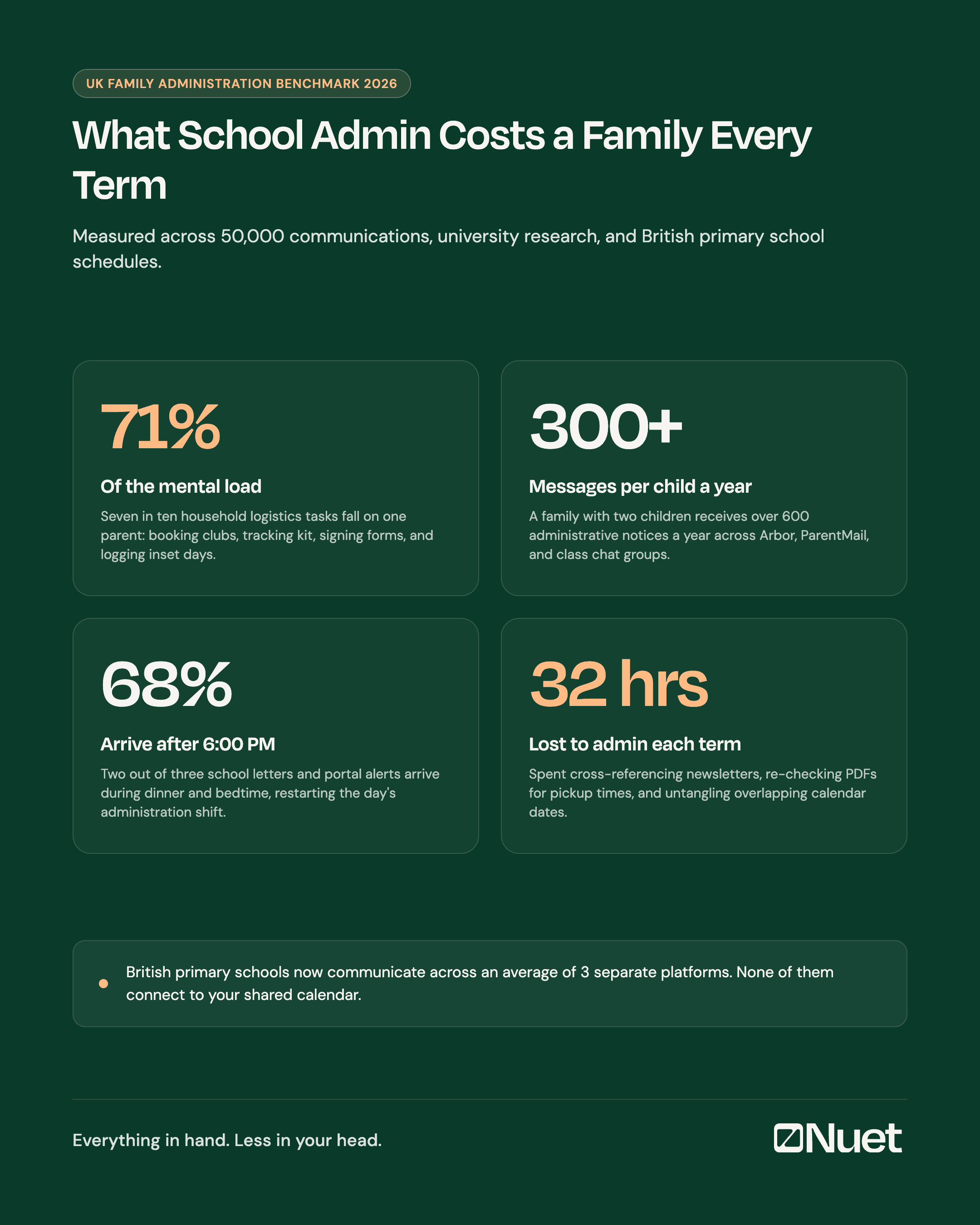
For most UK parents, the biggest time sink is processing school communications: newsletters arrive, you read them, you hopefully remember to add dates to your calendar, and then you remember to actually check that calendar. Apps like Nuet short-circuit this process by handling the first three steps automatically.
Do Parenting Apps Work With UK Schools?
Most UK schools use one of several communication platforms — Parentmail, Arbor, ClassDojo, Seesaw, or plain email. The compatibility varies by app:
Nuet works with any school that sends emails (covers most UK schools regardless of platform)
Classlist requires the school to adopt it as their parent platform
Google Calendar and Cozi have no school integration at all
Hoop lists activities but doesn't integrate with school communications
If your school sends important information by email (and most do), an email-scanning app like Nuet will work regardless of which platform they use.
The Bottom Line
Parenting apps in 2026 range from simple shared calendars to AI-powered assistants that scan your inbox automatically. The best choice depends on your specific need.
For UK parents whose biggest challenge is keeping on top of school communications, Nuet eliminates the manual work of transferring email events to your calendar. For families wanting a simple shared hub, Cozi remains solid. For co-parents, OurFamilyWizard is purpose-built.
The key question is not which app has the most features — it's which one removes a step you currently do manually.
What is the best parenting app for 2026?
The best parenting app depends on your needs. For automatic school email organisation, Nuet is the best option in 2026 — it scans your inbox and creates calendar events without manual work. For shared family calendars, Cozi is popular and free. For co-parenting, OurFamilyWizard is purpose-built for custody coordination.
Are there good free parenting apps?
Yes — Google Calendar (family sharing), Cozi (with ads), Classlist (if your school uses it), and Hoop (for finding activities) all have free tiers. Most premium parenting apps like Nuet and OurFamilyWizard offer free trials so you can test before committing.
What parenting apps do UK parents use?
UK parents commonly use Cozi for shared calendars, Hoop for finding local activities, Classlist for school community connection, and increasingly Nuet for automatic school email scanning. Google Calendar remains the default for basic family calendar sharing.
Is there an app that reads school emails?
Yes — Nuet is specifically designed to scan school emails, newsletters, and communications from platforms like Parentmail, Arbor, and ClassDojo. It extracts dates, times, and event details automatically and adds them to your calendar. Gmail has basic event detection but misses most school-related communications.
How do I stop missing school events?
The most common reason parents miss school events is that important dates arrive buried in long newsletter emails or PDF attachments. Using a parenting app like Nuet that automatically scans your email and creates calendar events — with reminders several days in advance — is the most reliable way to ensure nothing slips through.
As children get older, you may also be exploring options like a parent child tracking app or an Apple Watch to help them manage their own time and school schedule securely.
Frequently Asked Questions (People Also Ask)
What are the best apps for parents in the UK?
Top UK parenting apps target specific everyday pain points: Hoop and ClassForKids for children activities, Wonder Weeks for developmental milestones, and Nuet for automatically tracking school dates, letters, and logistics without carrying the mental load in your head.
How do busy UK parents keep track of school schedules?
British schools routinely send updates across multiple channels: Arbor portals, ParentMail alerts, and class chat threads. The simplest approach is using an automated parent assistant that captures dates as emails arrive and adds them to your phone calendar with all the details intact.
What is the difference between a family organiser and a shared calendar?
A shared calendar only displays events you manually type into it. A true family organiser handles the administrative overhead: extracting dates from school letters, alerting both parents, and ensuring nothing slips through the cracks.