We tested and compared 7 family organizer apps in 2026 to find which ones actually reduce the mental load for busy parents — from AI-powered school email scanners to shared family calendars. Here are the results, ranked by how well they handle real family life. Updated July 2026.
We tested the most popular family organizer apps in 2026 to find out which ones truly reduce the mental load for busy parents. Here's what we found.
What We Looked For
A great family organizer app in 2026 should:
Capture events automatically – from emails, photos, screenshots, and voice notes
Sync with calendars you already use – Google, Microsoft, or iCloud
Surface important deadlines proactively – not just store them
Handle everything – school events, payments, bookings, activities, medical, social
Respect your privacy – process information without storing personal emails
The 7 Best Family Organizer Apps for 2026
1. Nuet – Best Overall for Busy Parents
What it does: Nuet acts as your parent assistant. Connect your email accounts and Nuet automatically finds events buried in school newsletters, booking confirmations, payment reminders, club updates, slides, and more – then syncs them to your calendar. You can also snap photos of flyers, forward emails, or use voice to capture anything on the go.
Key features:
Automatic email scanning across Google, Microsoft, and iCloud
Share extension for capturing from any app (WhatsApp, Safari, screenshots)
Proactive reminders days before you need to act – not just minutes before
Daily and weekly digests highlighting what's coming up
Family member tagging – assign events to the right person
Full two-way calendar sync with Google Calendar, Outlook, or Apple Calendar
Voice and photo input for on-the-go capture
Pricing: 7-day free trial, then subscription.
Best for: Parents who receive a flood of emails, messages, and notifications from schools, clubs, and services, and want everything organized automatically without manual data entry.
Why it's #1: Unlike every other app on this list, Nuet doesn't ask you to type events in manually. It finds them where they already live – in your inbox, your photos, your WhatsApp messages – and puts them on your calendar before you forget. It then reminds you several days ahead when you need to take action.
2. Cozi Family Organizer
What it does: Cozi is a shared family calendar with shopping lists, to-do lists, and a recipe box. Events are added manually or via email forwarding on the paid tier.
Best for: Families who want a simple shared calendar and are happy entering events manually.
Limitation: No automatic event capture from emails. The forwarding feature (paid only) requires you to manually send each email – Cozi won't scan your inbox. See our full Nuet vs Cozi comparison for a detailed feature breakdown.
3. Google Calendar (Shared)
What it does: Google Calendar's family sharing lets household members see each other's calendars in one view.
Best for: Families already deep in the Google ecosystem who want a basic shared view.
Limitation: While Gmail does detect some events (flights, hotel bookings), it misses the majority of school-related communication, club schedules, and anything that arrives as a newsletter or PDF attachment. No photo capture, no voice input, no proactive reminders. (If you are looking to sync schedules between two partners, read our guide on how to set up a joint calendar for couples).
4. Apple Family Sharing (iCloud Calendar)
What it does: Apple's built-in shared calendar lets family members share a calendar directly through iCloud.
Best for: All-Apple households who want basic calendar sharing without installing anything extra.
Limitation: Only works when everyone has an iPhone/iPad. No automatic event extraction from emails. You still need to manually type every school event, appointment, and deadline. Read our guide to Nuet + Apple Calendar to see how automatic capture works alongside iCloud.
5. Jam (formerly FamCal)
What it does: Jam is a colourful shared family calendar designed to be visually appealing and family-friendly.
Best for: Families who want a visually fun calendar experience the kids will also enjoy using.
Limitation: All events are added manually. No email scanning, no photo capture. Beautiful calendar, but you're still the one doing all the data entry. Jam is priced at $15.99/month or $119.99/year after a 30-day trial — read our full Jam Family Calendar pricing vs Nuet comparison to see how automated inbox capture compares with manual family scheduling.
6. Skylight Calendar
What it does: Skylight is a hardware-and-software family calendar – a wall-mounted 15-inch display that shows the family schedule.
Best for: Families who want a visible, always-on display in a shared space like the kitchen.
Limitation: Requires a hardware purchase ($159–$299) plus an ongoing subscription for features like magic import. Still relies on events being in a synced calendar – if the events aren't captured in the first place, Skylight can't display them. See our full Nuet vs Skylight Calendar comparison for more details.
7. TimeTree
What it does: TimeTree is a shared calendar app with in-app messaging and memo features.
Best for: Couples or families who want a lightweight shared calendar with built-in messaging.
Limitation: All manual entry. No event detection from emails, photos, or documents.
The Bottom Line
If you're still manually typing every school event, birthday, and practice schedule into a calendar, you're solving yesterday's problem with yesterday's tools.
The best family organizer apps in 2026 should work for you – pulling events from the places they naturally arrive (email, messages, photos) and putting them where you'll actually see them (your real calendar).
Nuet is the only app on this list that does this end-to-end: automatic capture from email, photos, and voice – organized by family member – synced to Google, Microsoft, or iCloud – with proactive reminders days before you need to act. Start your 7-day free trial and see what you've been missing.
FAQ: Family Organizer Apps
What is the best family calendar app for 2026?
Nuet is the best family calendar app for 2026 if your priority is reducing manual work. It automatically extracts events from your emails, photos, and voice notes, then syncs everything to Google Calendar, Outlook, or Apple Calendar. For families who prefer a simple shared calendar with manual entry, Cozi or Google Calendar are solid free options.
Can Google Calendar work as a family organizer?
Yes, Google Calendar supports family sharing with colour-coded calendars. However, it doesn't automatically capture events from school newsletters, photos, or documents. You'll need to manually add most family events yourself, or use a tool like Nuet that detects events in emails and syncs them to your Google Calendar.
Is there a free family calendar app?
Yes – Google Calendar, Apple Calendar, Cozi (with ads), and TimeTree have free tiers, while apps like Jam require a paid subscription ($15.99/mo or $119.99/yr) after a 30-day trial. Nuet offers a 7-day free trial with full features including automatic event capture from emails and photos.
What's the difference between a family organizer app and a shared calendar?
A shared calendar (like Google Calendar or iCloud) lets family members see each other's events. A family organizer goes further – capturing events from emails, photos, and messages so you don't have to type them manually, plus features like digests, proactive reminders, and family member tagging.
Do family calendar apps work with school emails?
Most family calendar apps don't interact with email at all. Nuet is specifically designed to scan school newsletters, booking confirmations, payment reminders, and club communications, then extract dates, times, and details into calendar events automatically.
Frequently Asked Questions (People Also Ask)
What is the best app for a shared family calendar?
The right app depends on how much manual entry you want to do. Traditional apps like Cozi and TimeTree require typing every event by hand. Purpose-built family organiser apps like Nuet automate the process by extracting events and deadlines directly from school emails.
Is Cozi better than Google Calendar for families?
Cozi offers family-friendly touches like shared grocery lists and a color-coded feed, whereas Google Calendar integrates more reliably with work setups. However, many parents find Cozi sync delays frustrating, especially when coordinating school schedules across multiple devices.
What is the best calendar app for UK school parents?
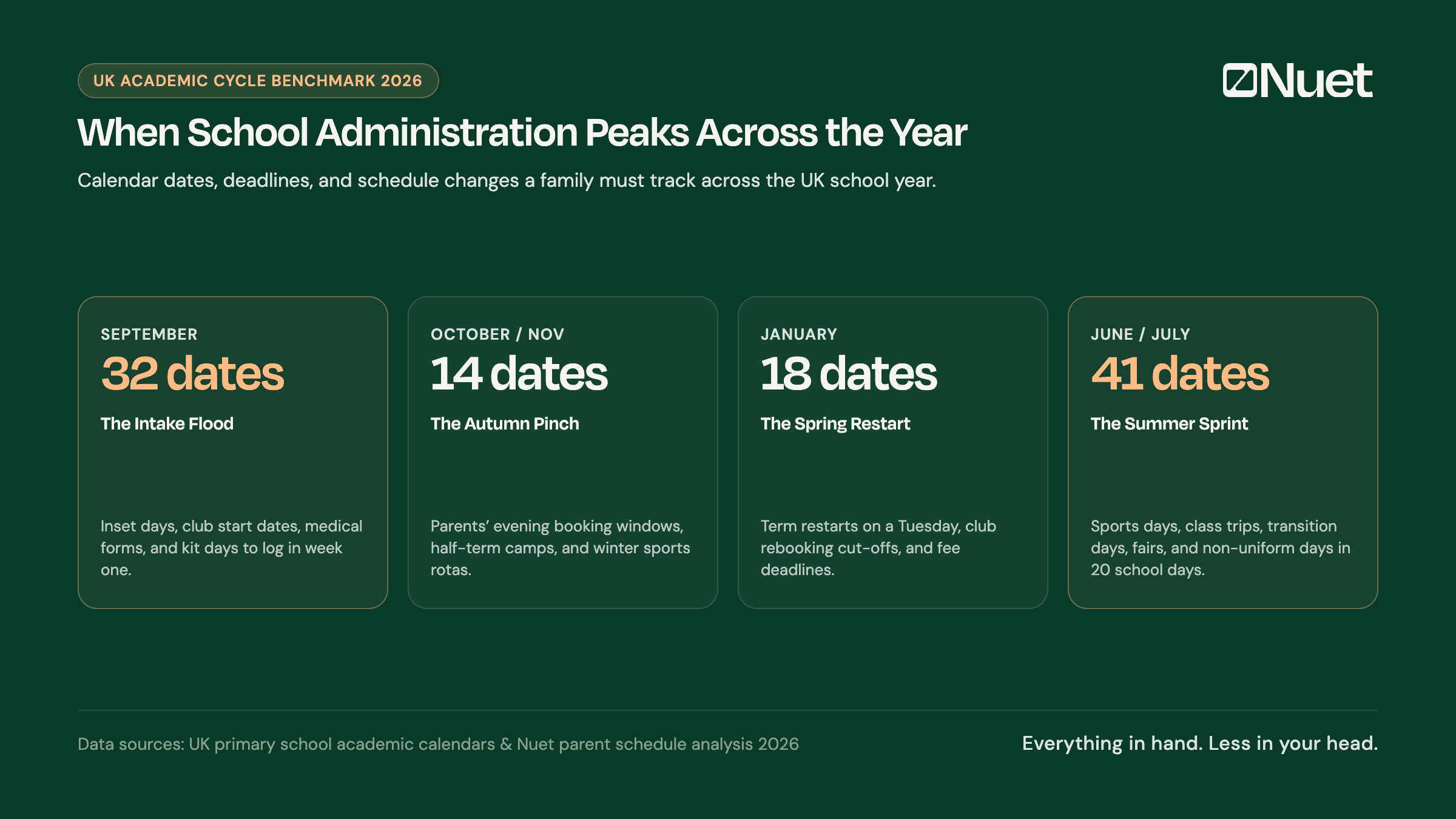
For UK households, the primary challenge is juggling notices across Arbor, ParentMail, and class groups. Solutions that automatically convert school newsletters into calendar dates eliminate manual admin and keep both parents aligned on inset days and term dates.